top of page
Search

in this post let us see how can we capture the error details in case of a PATCH function fails. Basically PATCH do not directly return the error details. So, we can make use of Errors function to show the type of error with details. Below is an example snippet on how to use Errors function.

Patch(Students,Defaults(Students),{crecb_name:Blank()},{crecb_emailaddress:"powerassist@gmail.com"});If(IsEmpty(Errors(Students)),Notify("Success",NotificationType.Success),Notify(First(Errors(Students)).Message,NotificationType.Error))

In the above example, we have passed EMPTY value to a required field to capture the error details and below are the reference on the outcome

ree
ree

refer https://docs.microsoft.com/en-us/powerapps/maker/canvas-apps/functions/function-errors#description for more details to know the type of error and it's information



in this post let us see, how can we validate a PATCH function is successful or failure


we can leverage this with "two forms" or "PATCH used against controls" on canvas app


with two forms:

  • frmStudentGenInfo

  • frmStudentContactInfo

on SUBMIT button use the below expression

IfError(Patch(Students,Defaults(Students), frmStudentGenInfo.Updates,frmStudentContactInfo.Updates),Set(varSuccess,true);Set(varFailure,false),Set(varFailure,true);Set(varSuccess,false));If(varSuccess,Navigate('Success Screen'),If(varFailure,Navigate('Failure Screen')))

with controls on canvas app:

IfError(Patch(
    Students,
    Defaults(Students),{studentName: txtStudentName, email: txtStudentEmail}),Set(varSuccess,true); Set(varFailure,false), Set(varFailure,true);Set(varSuccess,false));
If(varSuccess,Navigate('Success Screen'),If(varFailure,Navigate('Failure Screen')))

So, basically we are setting up two variable values - to take respective actions based on the IfError function.


If the PATCH is successful - redirecting user to SUCESS SCREEN

If the PATCH is failed- redirecting user to Failure SCREEN (to show appropriate message)

ree


  • Aug 4, 2020
  • 1 min read

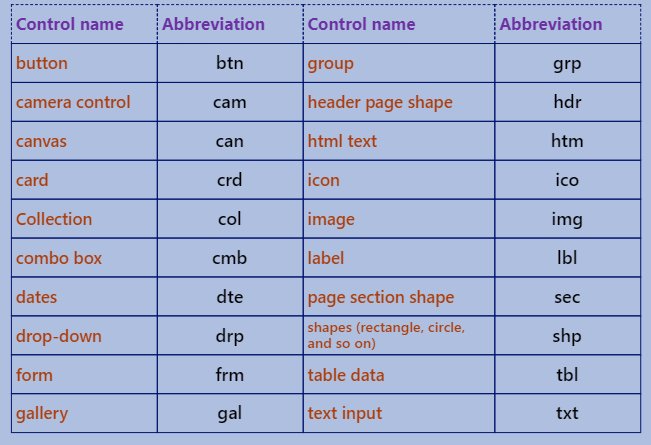
in this post let us see the standard naming conventions


use CAMEL case for controls and variables --- use PASCAL case for data sources


Camel case

use camel case for controls and variables. Example, a text input control might be named txtUserEmailAddress.

Pascal case

use Pascal case for data sources. Example, a common data source in PowerApps is the Microsoft Office 365 Users connector, which is named Office365Users in your code.

Screen Names

use plain language for the screen names. Examples - Home Screen, User Profile Screen, Search Screen.

Variable Names

• Prefix context variables with loc (Example: locSuccessMessage)

• Prefix global variables with gbl (Example: gblFocusedBorderColor)

Code comments

• Line comments: If a double forward slash (//) is added to any line of code, PowerApps will treat the rest of the line (including the //) as a comment. Use line comments to explain what happens next. You can also use them to temporarily disable a line of code without deleting it (therefore, they’re useful for testing).

• Block comments: Any text that’s wrapped inside /* and */ will be treated as a comment. Whereas line comments comment out only a single line, block comments can comment out multiple lines. Therefore, they’re useful for multiline comments (such as a code module header). You can also use them to temporarily disable multiple lines of code while you’re testing or debugging.

ree


bottom of page