Naming Convention in PowerApps
- Sai Krishna
- Aug 4, 2020
- 1 min read
in this post let us see the standard naming conventions
use CAMEL case for controls and variables --- use PASCAL case for data sources
Camel case
use camel case for controls and variables. Example, a text input control might be named txtUserEmailAddress.
Pascal case
use Pascal case for data sources. Example, a common data source in PowerApps is the Microsoft Office 365 Users connector, which is named Office365Users in your code.
Screen Names
use plain language for the screen names. Examples - Home Screen, User Profile Screen, Search Screen.
Variable Names
• Prefix context variables with loc (Example: locSuccessMessage)
• Prefix global variables with gbl (Example: gblFocusedBorderColor)
Code comments
• Line comments: If a double forward slash (//) is added to any line of code, PowerApps will treat the rest of the line (including the //) as a comment. Use line comments to explain what happens next. You can also use them to temporarily disable a line of code without deleting it (therefore, they’re useful for testing).
• Block comments: Any text that’s wrapped inside /* and */ will be treated as a comment. Whereas line comments comment out only a single line, block comments can comment out multiple lines. Therefore, they’re useful for multiline comments (such as a code module header). You can also use them to temporarily disable multiple lines of code while you’re testing or debugging.
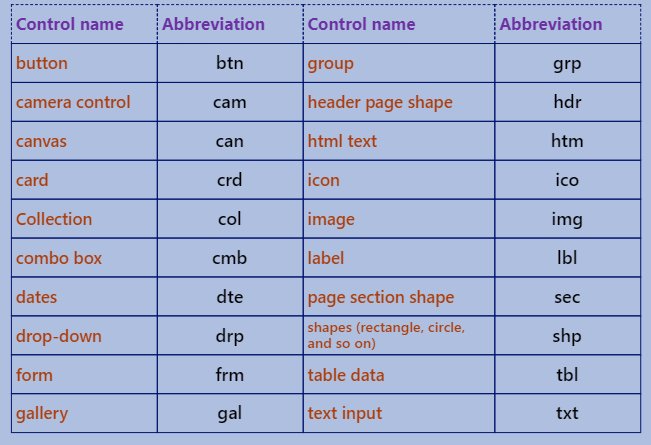


Comments